
Matchups for Every Game
Tournament week is the busiest week of the year for a video board operator. Every game needs its own matchup graphic, and you don’t know the second round until the first one is played. Building each one by hand, in a hurry, is where typos and wrong logos sneak in.
Tournament Batch Rendering lets you set up every game once and render all the matchups together. It works the same way for a regular-season schedule.
A collection built for matchups
Create a collection and start from the Matchup template. Each entry is one game with a home side and an away side. For each team there’s a school name, mascot, logo, city, primary and secondary colors, and record.
Type the games in, or import your bracket or schedule as a CSV with one row per game. Your column names get matched to fields the same way they do for a roster.
Matchup collections have a switch called Use Brand Kit for Home Team, and it’s on by default. For your own season schedule, leave it on. Your school fills the home side from your Brand Kit, so each row only needs the opponent. Hosting a tournament where the home team changes from game to game? Switch it off and fill in both sides.
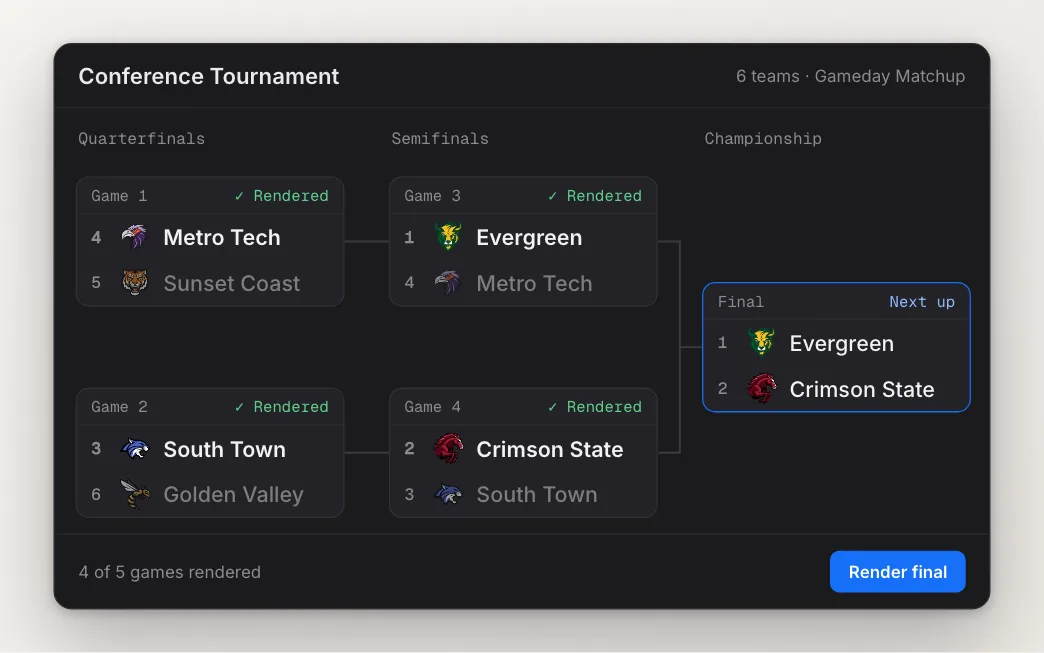
Render the bracket
Link the collection to a matchup template and every home and away field lines up with its column. Preview one game to check the logos and colors, then select the games you want and render. Each game comes out as its own video.
Brackets fill in as the week goes on, and your collection can too. When the semifinals are over, add the championship game as a new row, select just that one, and render it. The earlier games are already waiting in your exports.
Your data outlasts the design
The games live in your account, not inside a template. Want a different look for the playoffs? Link the same collection to a new matchup template and every game fills the new design. You don’t retype a thing.
Next season, the schools, logos and colors you entered are still there. Update the opponents and details that changed, then render again. The first tournament takes some setup. The next one mostly takes a few edits.
See how it works on the Matchups page, or read Linking a collection for the step by step.