
Introducing Batch Rendering
Most game-day content comes in sets. One intro per starter. One matchup per game on the schedule. One graphic per sponsor. The design stays the same and only the details change.
Until now, making a set in SportStudio meant going one video at a time. Type the name, render, wait, type the next name, render again. Batch Rendering turns that into a single step. You pick the data and we make every version.
Start with a collection
A collection is data you save once and reuse, like a roster or a list of games. Build one in the Collections panel by typing entries in, or import a spreadsheet as a CSV. SportStudio reads your column names and matches them to its own fields, so “jersey” lands in Number and “photo” lands in Headshot without you mapping each one by hand.
Collections live in your account, not inside a template. The roster you import in August is still there in February, ready for a different design.
Link it to a template
Open any template and pick a collection from the Link a collection dropdown. SportStudio lines up the template’s fields with your columns by name. A name field picks up your name column, color fields pick up colors, and a headshot slot picks up headshots.
Each linked field gets a small chain icon. Click it to point the field at a different column, or to unlink it. Linked text and color fields stay editable, too. Type your own value and that field unlinks and keeps what you typed.
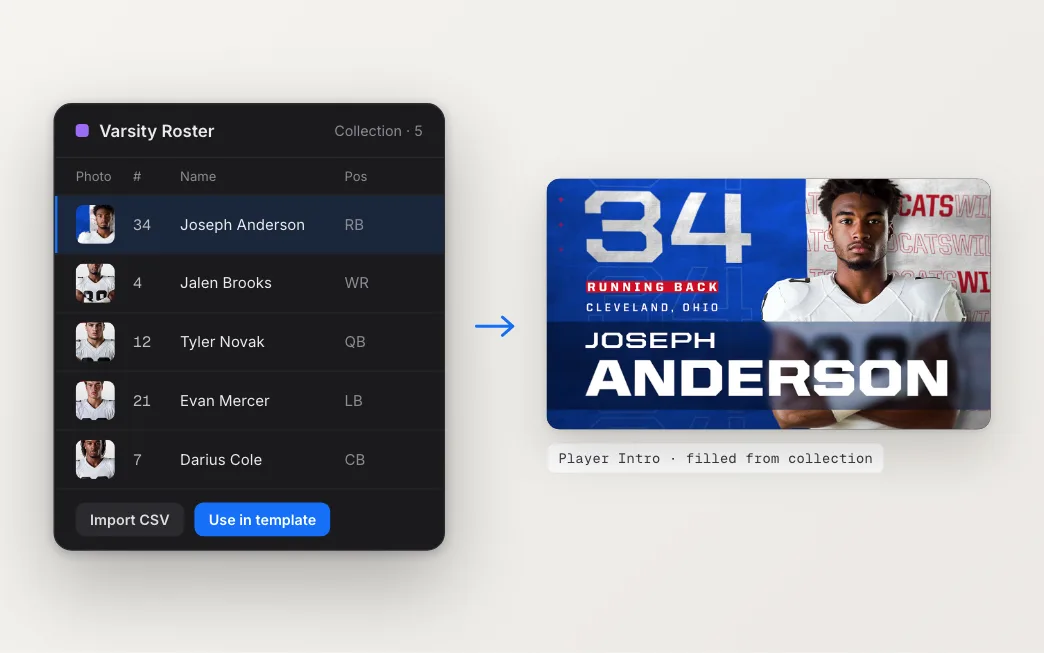
Before you render the whole set, use the Preview dropdown to load a single entry into the template. Check that the longest name fits and the right photo shows up. That one check saves a lot of re-rendering.
Render the set
Open Select items to render, choose the entries you want (or Select All), and click Render. SportStudio creates one video per entry and sends them to our render machines, which work through them side by side instead of one after another.
In your exports, the batch shows up as one card instead of a wall of separate ones. The card counts how many are done, lists every item with its own progress bar, and has a single Download button that grabs every finished file.
You don’t have to watch it. Close the tab and the renders keep going. Check the email option when you export and we’ll let you know when the batch is done.
Built to grow
Batch rendering is the base for a lot of what comes next, from full-roster headshot runs to every matchup in a tournament. The idea stays simple: design it once, fill it with your data, and render the whole set.
The Linking a collection guide walks through it step by step, and the Batch Rendering page has the overview.