
The Online Editor and Timeline
Our templates are built in After Effects. That’s the right tool for making them. It’s the wrong tool for changing “Saturday” to “Friday” an hour before tip-off, because After Effects lives on one workstation and the person who needs the change usually isn’t sitting at it.
The online editor puts the template in a browser tab. Open it, change what you need, and render. There’s nothing to install, and anyone on your team can do it.
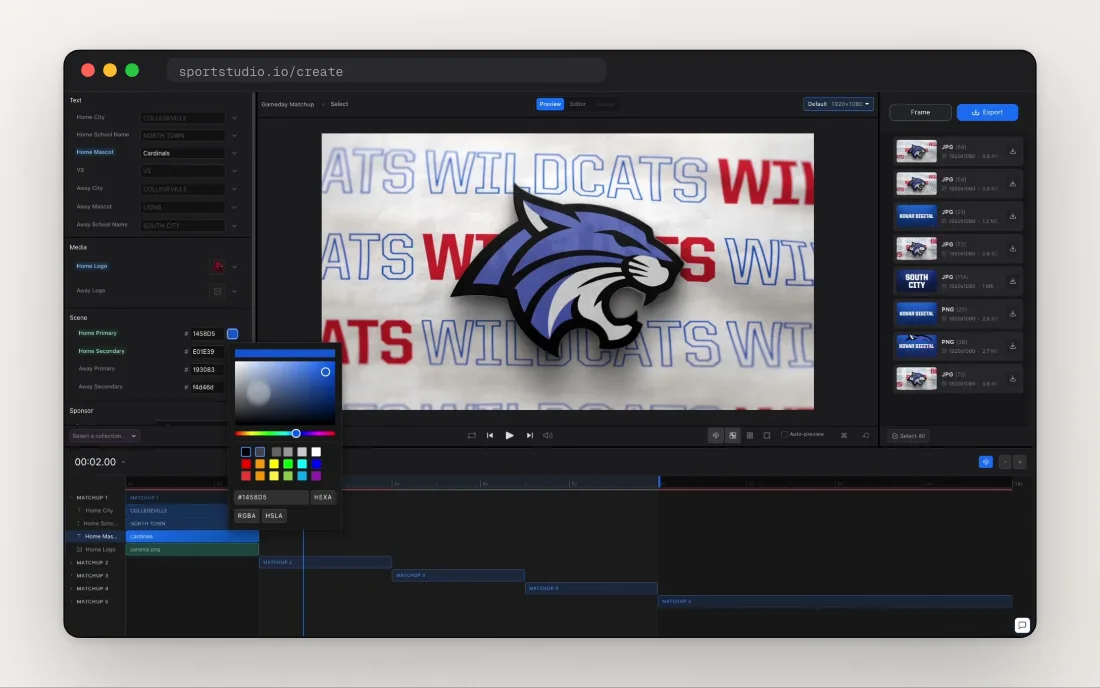
Four panels
The editor is built around four panels you switch between as you work:
- Editor: every field in the template, grouped into text, media and scene settings.
- Preview: a look at your video with your changes in it.
- Export: where you create the final file.
- Timeline: a visual map of the video and its sections.
Every field in one place
Click a text field and type. Twirl it open for more: font, position, size, opacity and color. Colors open a color picker, or take a hex value typed straight in. Logos and other media swap in from your uploads.
Labels are color-coded, so you can tell where a value came from at a glance. Blue means you edited it. Green means it came from your Brand Kit, like your team colors or city. Purple means it’s linked to a collection.
That Brand Kit link does a lot of the work. Your colors and logos are already in place when a template opens, so on a lot of videos you’re mostly checking the details.
The timeline
Every template is made of sections we call modules. The timeline lays them out in order under a ruler, the way a video editor would.
Drag the playhead to scrub, or click the ruler to jump. Click a module to open it. Its layers load into the editor, so you can work on that section’s text and media. Click it again to collapse it. Use Fit to see the whole video, or zoom in to work on a short section.
The real project, not a lookalike
This is the part we care about most. What you edit in the browser is the actual After Effects template. When you render, your edits go to our render machines, which open that project, apply your changes and render it. What you download matches what a motion designer would have built by hand, because it came out of the same file.
It also means you can make a fix from anywhere. Start at your desk, and finish on a laptop in the gym if the lineup changes late. All you need is a browser.
The editor panel guide is a good first stop, and the Online Editor page has the full tour.